
Introduction
Welcome to the Emporio Business Bank Wire Transfer Token, the ultimate tool for secure and convenient wire transfers. In today’s digital age, safeguarding your financial transactions is paramount. The Emporio Business Bank Wire Transfer Token offers cutting-edge security features and unparalleled ease of use, ensuring your transactions are both safe and efficient.
Features
Advanced Security Measures
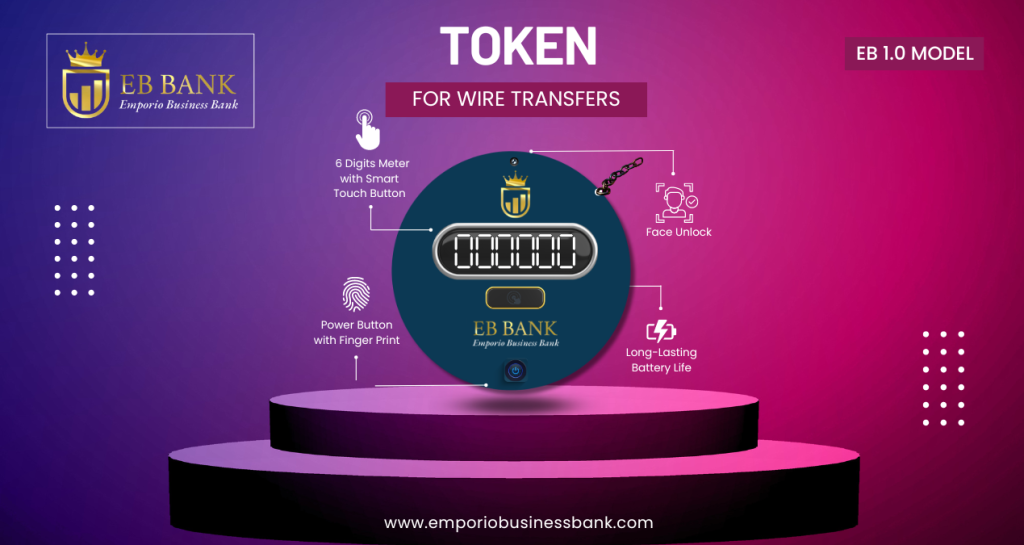
Facial Recognition: Utilize state-of-the-art facial recognition technology to verify your identity before authorizing any wire transfer. This biometric feature ensures that only you can access and use your Emporio Business Bank token.
Fingerprint Authentication: Complementing facial recognition, fingerprint authentication adds an extra layer of security. Your unique fingerprint is required to authorize transactions, making unauthorized access virtually impossible.
PIN Code Protection: For additional security, the token provides a personal identification number (PIN) to be entered within 30 seconds before transactions can proceed. This three-tier security system (facial recognition, fingerprint, and PIN) ensures maximum protection.
Master Key with NFC Chip: The included master key contains an NFC (Near Field Communication) chip, enabling secure, contactless interactions with your token. This key is essential for the initial setup and can serve as an emergency access tool if needed.
Convenience and Flexibility
Hassle-Free Transactions: Unlike traditional methods requiring a local phone number for SMS-based OTPs (One-Time Passwords), the Emporio Business Bank Wire Transfer Token provides an integrated authentication process. This means you can perform transactions without the need for a local phone number or waiting for an SMS.
Works Anywhere, Anytime: Whether you’re traveling internationally or working remotely, the Emporio Business Bank Wire Transfer Token ensures you can conduct wire transfers from anywhere in the world at any time. It offers seamless global functionality, breaking down geographical barriers.
Design and Usability
Compact and Durable Design: Designed to be both sleek and robust, the token is easy to carry and built to withstand everyday wear and tear. Its ergonomic design ensures that it fits comfortably in your hand or pocket.
Easy-to-Use Interface: The user interface is intuitive and user-friendly, ensuring that even those who are not tech-savvy can easily navigate and use the token. Clear instructions and prompts guide you through every step of the process.
Lock Button for Additional Security: The token features a physical lock button that can be activated when the token is not in use. This adds an extra layer of security, ensuring that your Emporio Business Bank token remains secure even if it is lost or stolen.
Additional Features
Encrypted Data Storage: All data stored on the token is encrypted, protecting your sensitive information from potential threats. This ensures that your transaction details and personal data remain confidential and secure.
Multi-Language Support: The token supports multiple languages, making it accessible to Emporio Business Bank users worldwide. You can select your preferred language during the initial setup.
Long Battery Life: Equipped with a high-capacity battery, the token offers long-lasting performance. You won’t have to worry about frequent recharging, making it a reliable tool for daily use.
Setting Up Your Emporio Business Bank Token
Unboxing and Initial Setup
When you receive your Emporio Business Bank Wire Transfer Token, you’ll find the following items in the box:
- The wire transfer token
- A master key with NFC chip
- A USB charging cable
- A user manual
Activation Process
- Charge the Token: Use the included USB cable to fully charge the token before use.
- Activate the Token: Press and hold the power button until the device powers on. Follow the on-screen instructions to complete the initial setup.
- Facial Recognition Setup: Position your face in front of the token’s camera and follow the prompts to register your facial biometrics.
- Fingerprint Registration: Place your finger on the designated sensor and follow the instructions to complete the fingerprint registration process.
- Set Up Your PIN: Choose a secure PIN and enter it when prompted. This will be used as an additional layer of security.
Linking with Your Emporio Business Bank Account
- Access Your Online Banking Portal: Log in to your Emporio Business Bank account via the online banking portal.
- Navigate to Security Settings: Go to the security settings section and select “Link New Token.”
- Follow On-Screen Instructions: Follow the instructions to link your new token to your account, using the master key with NFC chip for secure verification.
Using the Token
Conducting Wire Transfers
- Initiate Transfer: Log in to your Emporio Business Bank account and navigate to the wire transfer section.
- Enter Transfer Details: Provide the necessary details for the wire transfer, including the recipient’s information and the amount.
- Authenticate Transfer: Use your token to authenticate the transfer. This involves facial recognition, fingerprint authentication, and entering your PIN.
- Confirm Transfer: Once authenticated, review the transfer details and confirm the transaction. You will receive a confirmation message indicating the success of the transfer.
Authentication Methods
Facial Recognition: Hold the token up to your face. The camera will automatically scan and verify your identity.
Fingerprint Authentication: Place your finger on the sensor to authenticate the transaction.
PIN Code: Enter your PIN when prompted to complete the authentication process.
Using the Master Key with NFC Chip
The master key with NFC chip is an essential tool for secure setup and emergency access. Hold the key near the token when prompted during the setup or in case you need to reset the token.
Utilizing the Lock Button
Activate the lock button when the token is not in use to prevent unauthorized access. To unlock, simply use your registered biometrics or enter your PIN.
Troubleshooting and Support
Common Issues and Solutions
Token Not Powering On: Ensure that the token is fully charged. If the problem persists, try using a different USB cable.
Authentication Failure: Make sure that you are using the correct biometrics and PIN. If you continue to experience issues, contact Emporio Business Bank support for assistance.
Master Key Not Recognized: Ensure that the master key is held close to the token and that the NFC chip is functioning properly.